




No ads in your focus app
AppBlock's free tier is ad-supported. An app you open to escape attention-grabbing design should not sell your attention back to you.
Giveaway Win 1 month of Appcognito Pro, free. Free entry, one per person. Enter now
Appcognito blocks apps and websites with a real on-device firewall, carries no ads on any plan, and sells a lifetime licence instead of a subscription. If AppBlock's ads, its Accessibility dependency or its yearly bill wore you down, this is the swap.
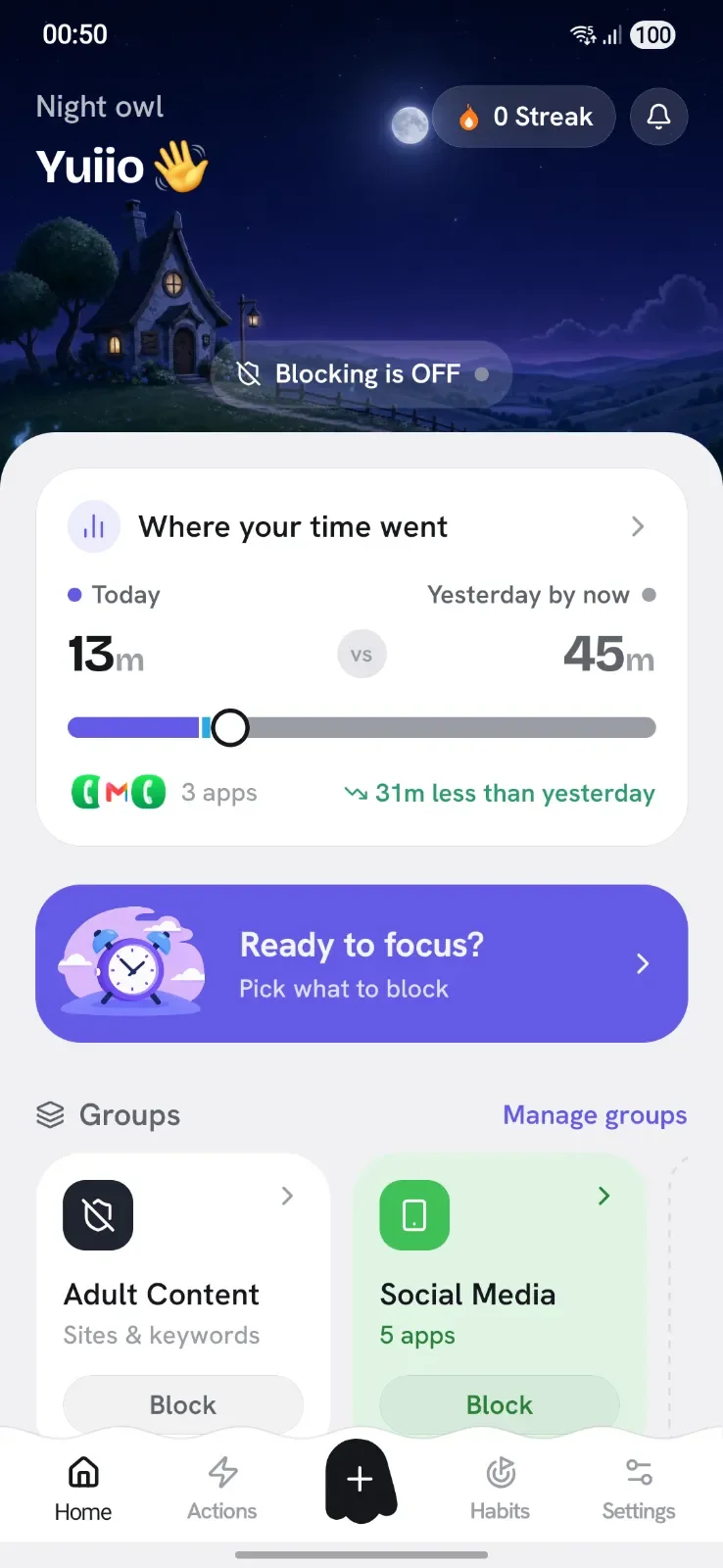
AppBlock is one of the most installed focus apps on the Play Store, and most people who search for an alternative are not unhappy with the idea of it. They are unhappy with one of four specific things, and it is worth naming them plainly before comparing anything.
The ads. The free tier is ad-supported. There is a particular kind of friction in opening an app to escape engineered distraction and being served an interstitial on the way in. It is not a dealbreaker for everyone, but it is the single most common reason people start looking.
The subscription. Premium is billed yearly at roughly $34.99, and there is no lifetime option to escape to. Side by side it is stark: what AppBlock charges for a single year, Appcognito charges once, for good. Over three years that is around $105 against $39, for a utility that runs entirely on your own phone and costs its developer nothing per user to operate.
The way it blocks. Like most Android blockers, AppBlock watches the Accessibility service to notice which app you just opened, then covers it with a blocking screen. That works, but it is a cover rather than a wall: the app underneath is running, loading and notifying. It also means granting the one Android permission that can read everything on your screen.
How easy it is to get around. Every blocker has an off switch. What matters is how much stands between you and it at 11pm. If you have found yourself disabling a block you set that morning, the problem is not that you lack discipline, it is that the app was designed to be easy to switch off.
Appcognito was built with different answers to all four. Here is the honest comparison.
Same job, done more privately and for far less. Here is where Appcognito pulls ahead.
AppBlock's free tier is ad-supported. An app you open to escape attention-grabbing design should not sell your attention back to you.
Appcognito blocks at the network layer on your device, so a blocked app opens to nothing loading and a blocked site fails in every browser at once.
Strict mode, an accountability code held by someone else, and reboot-proof uninstall protection. Three different ways to make a block outlast a bad five minutes.
AppBlock wants roughly $34.99 every year, with no lifetime option at all. Appcognito is ₹2,499 / $39 once and never again. Monthly and yearly plans exist too.
Every row is something Appcognito does today, checked against AppBlock's own Android information.
| Feature | Appcognito |  AppBlock AppBlock |
|---|---|---|
| What it blocks | ||
| Apps | ✓ | ½ |
| Websites | ✓ | ½ |
| Words on screen | ✓ | – |
| An app's internet, not the app | ✓ | – |
| Built-in adult site list | ✓ | $ |
| AI that spots off-topic screens | ✓ | – |
| Built-in gambling site list | ✓ | – |
| How it pushes back | ||
| Hard block | ✓ | ✓ |
| Mute notifications | ✓ | ✓ |
| Dim the app | ✓ | – |
| Slow its internet | ✓ | – |
| Pause before unlocking | ✓ | – |
| Pick apps at every unlock | ✓ | – |
| Timed unlocks | ✓ | $ |
| Strict mode | $ | ½ |
| Whole-phone screen breaks | ✓ | $ |
| What switches it on | ||
| Focus sessions | ✓ | $ |
| Weekly schedules | ✓ | ½ |
| Specific dates | ✓ | – |
| Daily time limits | ✓ | ½ |
| Open-count limits | ✓ | ½ |
| Location | ✓ | ✓ |
| Wi-Fi network | ✓ | ✓ |
| Bluetooth device | ✓ | – |
| Charging or battery level | ✓ | – |
| Movement | ✓ | – |
| Calendar events | ✓ | – |
| NFC tag or QR code | $ | – |
| Home-screen widget | $ | ? |
| Keeping you honest | ||
| PIN or fingerprint lock | $ | ✓ |
| A partner holds the code | $ | ½ |
| Uninstall protection | $ | ½ |
| Progress | ||
| Streaks | ✓ | ? |
| Usage report | ✓ | ½ |
| Daily habits | ✓ | – |
| Privacy | ||
| No account needed | ✓ | ✓ |
| Block lists stay on your phone | ✓ | ✓ |
| Price for a year of the paid plan | ||
| Paid plan | $14₹699 | ~$29.99 |
| Pay once, keep it for life | $39₹2,499 | ~$89.99 |
Based on each product's own public Android information: its website, help pages, pricing and Play listing. Competitor prices are in US dollars; "~" means the price came from a recent review because it is not published. Features and prices change, so check before you buy. Last reviewed 5 to 8 October 2026. Product names and logos are trademarks of their respective owners, used here only to identify each product.
AppBlock has been around a long time, it is on both Android and iPhone, and its scheduling interface is genuinely approachable for a first-time blocker. If you need one app across an iPhone and an Android device, or you want the most familiar option with the biggest install base, it remains a reasonable pick. This page is about the specific places it frustrates people enough to go looking, not a claim that it is bad software.
This is the real architectural difference, and it is worth understanding because it changes what blocking actually feels like.
A screen-cover blocker lets the app launch. The process starts, the feed loads in the background, notifications keep arriving, and a blocking screen is drawn on top. If the cover is slow to appear you get a half second of feed before it lands, which is the exact half second that matters. Kill the blocker's process and the app underneath is simply there, already running.
Appcognito runs a local VPN service, which sounds dramatic and is not: no traffic leaves your device, nothing is routed through a server, and there is no remote endpoint at all. It is simply the Android API that lets an app filter its own device's network traffic locally. That gives you two distinct kinds of block:
Website blocking works the same way. Because the filter sits below the browser rather than inside it, a blocked domain fails in Chrome, Firefox, Samsung Internet, Brave, and the in-app browser inside every other app, all at once. You do not maintain a list per browser, and opening a different browser is not a workaround.
Appcognito used to use the Accessibility service for launch blocking, like everyone else. It was moved off deliberately, onto usage access plus an overlay. Two reasons.
The first is reliability. Accessibility services are aggressively killed by Android's battery management, and several manufacturers are noticeably worse about it than others. A blocker that silently stops blocking is worse than no blocker, because you are relying on it.
The second is scope. The Accessibility service can read every piece of text on your screen, in every app, including your banking app and your messages. That is a lot of trust to hand an app just to be told which icon you tapped. In Appcognito it stays off unless you specifically turn on keyword blocking or the AI study guardian, which are the only two features that genuinely need to read the screen. App and website blocking never touch it.
Most people do not need a harder blocker. They need a blocker that is harder to turn off specifically in the ten minutes when they want to turn it off. Appcognito stacks three independent layers, and you can use one, two or all three:
On top of any of those, Pro adds reboot-proof uninstall protection, so deleting the app to escape a block is not the loophole it is in most blockers.
Some of these are the reason people switch and stay, rather than the reason they arrive:
No export file, no account to migrate. It takes about five minutes.

No account, no email, no sign-up screen. Open it and you are already set up.

Instead of re-picking apps one by one, turn on a built-in block list. Social Media, Gaming, Shopping and eight more ship ready to go.
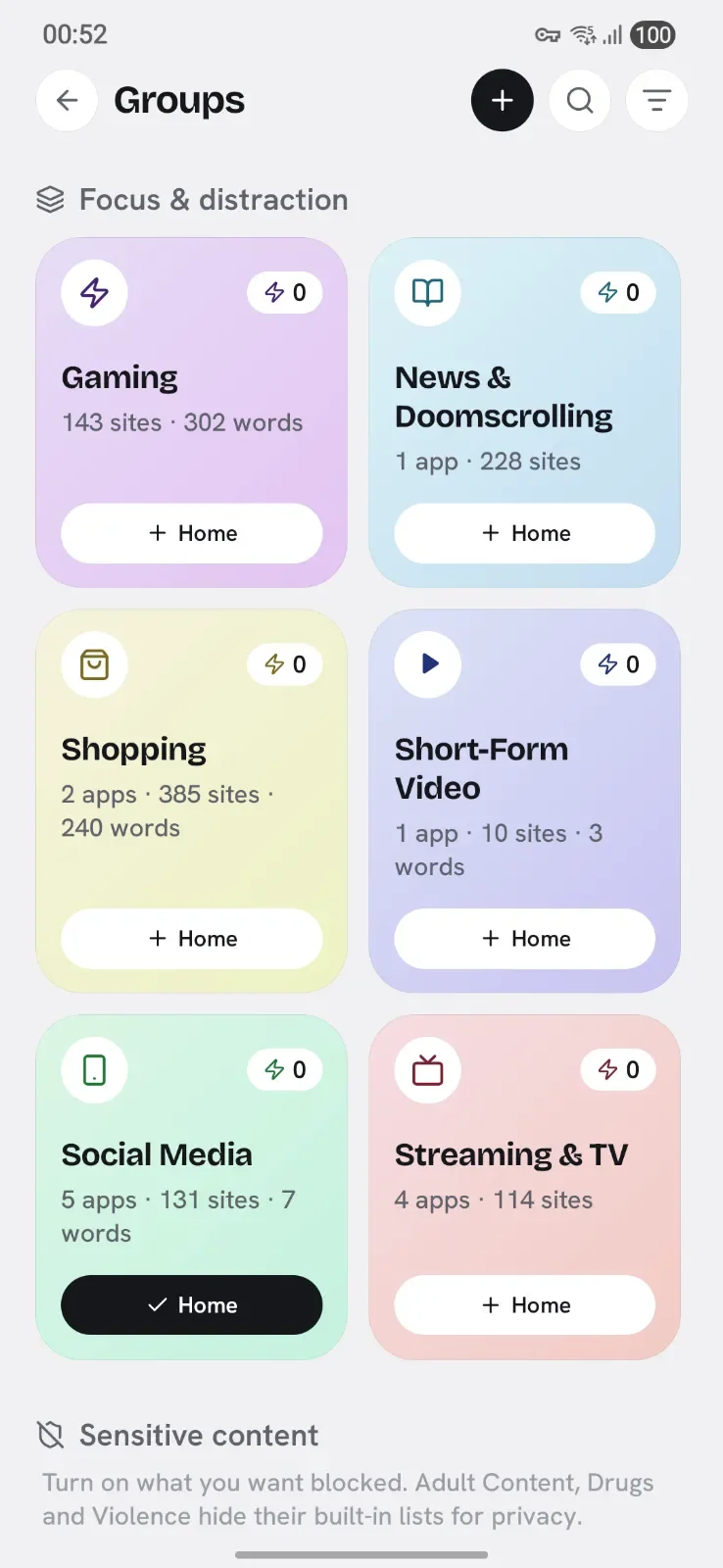

Your AppBlock schedules become rules. Same idea, 16 triggers instead of a handful, and they keep firing with the app closed.
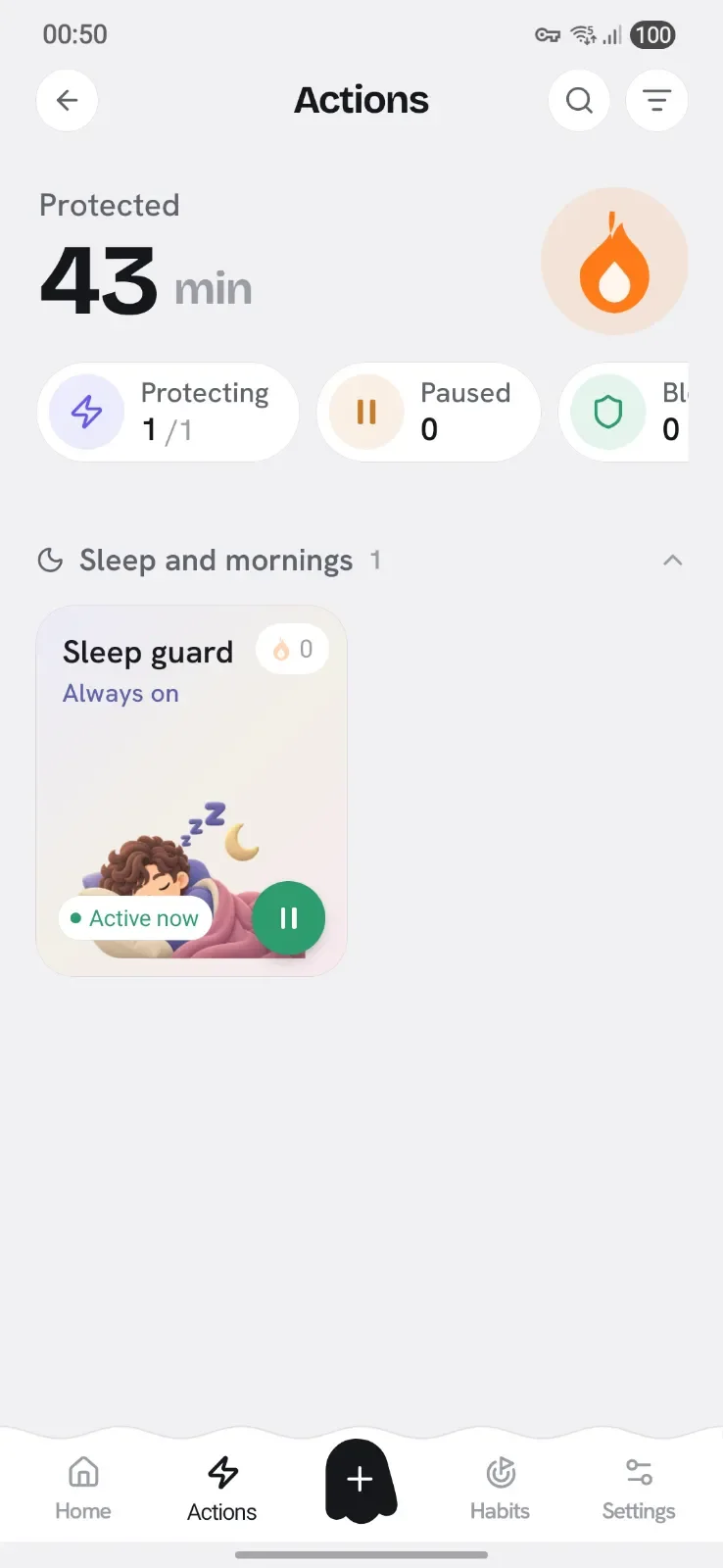

Do this last. Run both for a day so you can see nothing slipped through, then remove AppBlock and its ads with it.
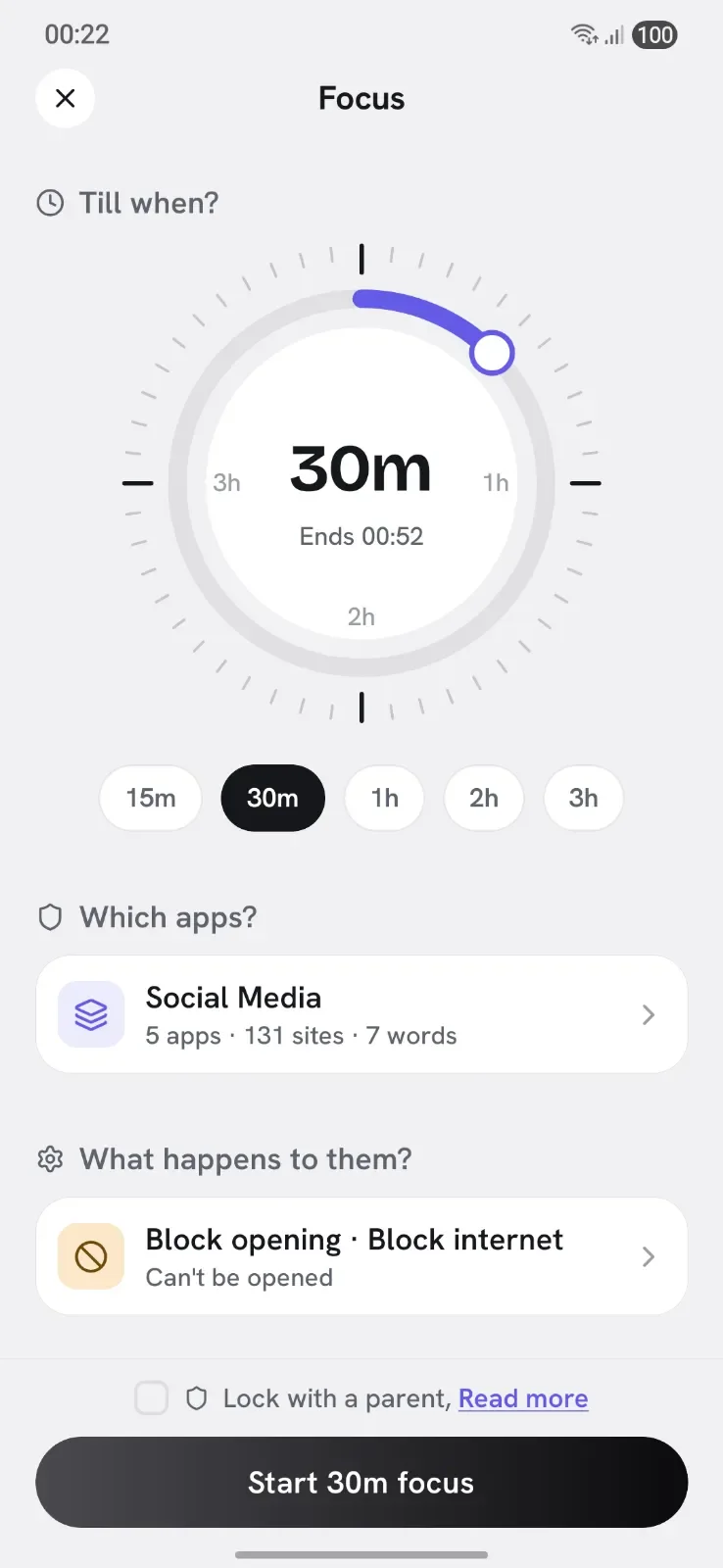

Stay with AppBlock if you need the same blocker on an iPhone and an Android phone, or you have years of schedules set up and they are working fine. A blocker you already trust and actually use beats a better one you have to rebuild. There is no prize for switching.
Switch to Appcognito if any of these are true: the ads bother you, you would rather pay $39 once than $35 every year, you want the block to hold when you would rather it did not, you are uncomfortable granting Accessibility access to a blocker, or you want to cut an app's internet without closing the app entirely.
You do not have to decide up front. Both can run at the same time, the free plan has no time limit, and the 7 day Pro trial needs no card and no Play Store checkout. Give it a week alongside what you have and keep whichever one you stop thinking about.
Still weighing options? The Freedom comparison covers the cloud-account tradeoff, and our roundup of the best app blockers for Android puts all of them side by side.
Appcognito is the closest match for someone leaving AppBlock: it does the same job (block apps and websites on a schedule) but blocks at the network level rather than by covering the screen, carries no ads on any tier, and offers a one-time lifetime price instead of a subscription. It needs no account, and nothing about your usage leaves the device.
No. There are no ads and no trackers on any plan, including the free one, and no data is ever sold. The app has no analytics SDK in it at all. That is the whole business model: you pay a small amount once or yearly, and that is the only way the app makes money.
Most Android blockers, AppBlock included, watch the Accessibility service to see which app you opened, then cover it. Appcognito moved app blocking off Accessibility onto a combination of usage access and an overlay, which is more reliable and means the permission that can read your whole screen stays off unless you specifically want keyword blocking or the AI study guardian. Fewer permissions, doing less, is the safer default.
Yes, with Pro. Reboot-proof uninstall protection uses Android's Device Admin API so the app cannot be removed while it is armed, and it survives a restart. Combine it with Strict mode and an accountability code held by a friend and there is no quick way out at all.
Yes, with no time limit and no ads. Every way of blocking works free: Quick Block, Focus, Rules, Block lists and Habits, all 16 triggers, all 11 built-in block lists, and keyword blocking. Free runs one block list and one rule at a time. Pro lifts that and adds Strict mode, accountability locks, uninstall protection and unlimited challenges. There is also a 7 day Pro trial that needs no card.
Not automatically. There is no import path between the two apps, because Appcognito has no account and no server to sync through. In practice rebuilding takes about five minutes: turn on a ready-made block list instead of re-picking apps, then recreate each schedule as a rule.
Not yet. Appcognito is Android-only today, with an iPhone version on the roadmap. AppBlock is on both, so if you need one app across an iPhone and an Android phone, AppBlock still has the edge there.
Weighing up more than one? Here is the honest version for each.
Cloud accounts and a yearly price several times higher
Desktop only, so your phone stays wide open
Built for iPhone first, at a premium subscription price
A timer that rewards you, but never actually blocks
A pause before the app opens, but no real block behind it

Free forever. Pro is $1.99 a month, $14 a year, or $39 once₹99 a month, ₹699 a year, or ₹2,499 once.
Swap wins, ask for help on a hard night, and tell us what to build next.
Be first to know when Appcognito hits Google Play. No spam, no account, ever.
You are on the list. We will email you the moment Appcognito lands on Google Play. No spam, ever.